Issue Flow & Escalation

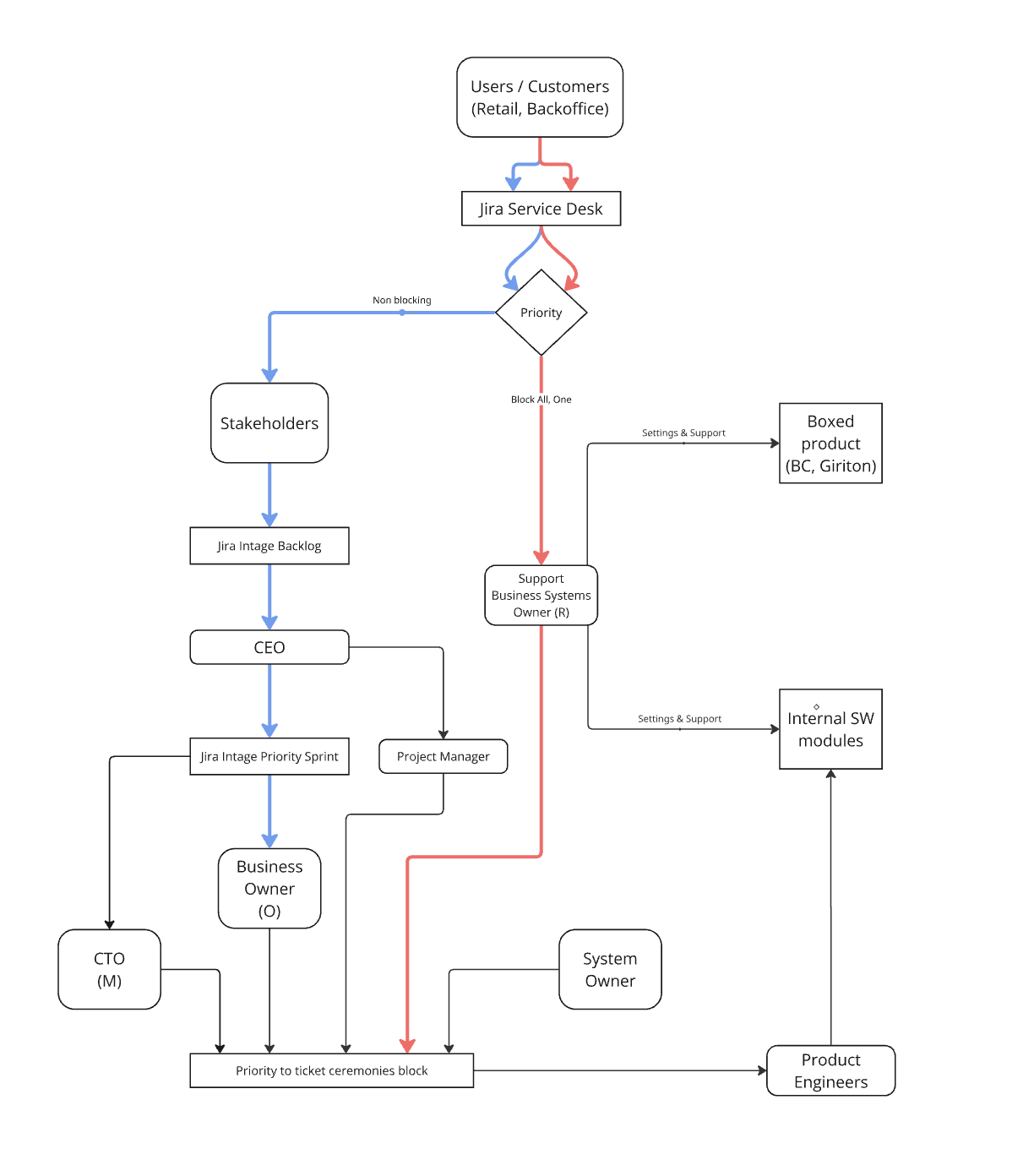
Every issue starts in Jira Service Desk. The first decision is whether it blocks work or can continue through the normal prioritization path.

Intake

Jira Service Desk

All issues enter here first.

Fast path

Blocking

Support takes the lead immediately.

Normal path

Non-blocking

Moves through prioritization and delivery.

Process diagram

How the flow branches

The diagram shows the English routing from intake to support, prioritization, and delivery.

Issue routing diagram showing blocking and non-blocking paths

Decision at intake

Triage classifies the issue by business impact, not by noise. The question is simple: does it block users or business operations right now?

Non-blocking

Use the normal prioritization path

The issue is important, but it does not stop work right now. Keep deep work protected and move the topic through the normal backlog.

  1. 1 Create the issue in Jira Service Desk.
  2. 2 Assign an owner and mark it non-blocking.
  3. 3 Move it into the intake backlog.
  4. 4 Review priority in Business Prioritization and Weekly Delivery Planning.
  5. 5 Create a delivery ticket once it is accepted.

Escalation note

The CEO joins only if the priority change has a company-level impact.

owner priority delivery ticket

Blocking

Use the support path now

The issue stops users, operations, or a business-critical process. Restore service first; plan the permanent fix later.

  1. 1 Create the issue in Jira Service Desk.
  2. 2 Business Systems Owner or the relevant support owner takes first response.
  3. 3 Stabilize the service as quickly as possible.
  4. 4 Escalate to System Owner or CTO only for a decision or technical change.
  5. 5 Create a follow-up Jira ticket for the permanent fix.

Purchased product

Vendor or product support

Internal SW module

Product Engineer

Infrastructure / identity

IT Operations Owner

Who helps first

service restored incident owner follow-up ticket
Simple rules

  • Every issue needs an owner, a date, and a Jira record.
  • Blocking issues never wait for weekly planning.
  • Non-blocking issues should not interrupt deep work.
  • When in doubt, use the support path first and de-escalate only after triage.

Role map

  • Business Systems Owner: user-facing support and business-system issues.
  • IT Operations Owner: infrastructure, workplace, identity, and digital services.
  • Product Engineer: software defects, internal modules, and follow-up fixes.
  • System Owner: reliability decisions, ownership clarity, and release-related escalation.
  • Business Owner: priority decisions for non-blocking work.
  • CTO: architecture or business-critical escalation only.

Related guidance